


We make your workflow faster by doing the boring work for you.


Elevate your album covers and creative projects with 10 Free Distant Design Textures, which includes 10 premium, high-resolution textures engineered to speed your workflow and refine your visual identity.
Why this pack?
Ready-to-use assets: 10 unique textures, each 3000 x 3000 px — ideal for album covers, single art, social posts, and high-res prints.
Instant quality boost: Hand-crafted, studio-grade finishes that add depth and tactile richness without overpowering your design.
Flexible layering: Seamlessly blend, mask, or colorize textures to match any aesthetic. Each texture has a transparent background.
Lossless detail at scale: 3000 x 3000 px gives you crisp detail for both digital release and print-ready deliverables, ensuring covers look polished from streaming thumbnails to vinyl sleeves.
Who benefits
Music producers and artists who need standout cover art fast.
Graphic designers and art directors looking for premium base materials to iterate quickly.
Creative teams who demand consistent, high-quality outputs across campaigns.
What you get
10 high-resolution texture files (3000 x 3000 px, 300 DPI) in SVG file format
Rights for personal and commercial use
Transform routine cover design into a deliberate, efficient creative process.
Buy this texture pack today and create covers that capture attention and stand out!
Elevate your album covers and creative projects with the Graphic Design Texture Pack #01, which includes 15 premium, high-resolution textures engineered to speed your workflow and refine your visual identity.
Why this pack?
Ready-to-use assets: 15 unique textures, each 3000 x 3000 px — ideal for album covers, single art, social posts, and high-res prints.
Instant quality boost: Hand-crafted, studio-grade finishes that add depth and tactile richness without overpowering your design.
Flexible layering: Seamlessly blend, mask, or colorize textures to match any aesthetic. Each texture has a transparent background.
Lossless detail at scale: 3000 x 3000 px gives you crisp detail for both digital release and print-ready deliverables, ensuring covers look polished from streaming thumbnails to vinyl sleeves.
Who benefits
Music producers and artists who need standout cover art fast.
Graphic designers and art directors looking for premium base materials to iterate quickly.
Creative teams who demand consistent, high-quality outputs across campaigns.
What you get
15 high-resolution texture files (3000 x 3000 px, 300 DPI) in SVG file format
Rights for personal and commercial use
Transform routine cover design into a deliberate, efficient creative process.
Buy this texture pack today and create covers that capture attention and stand out!
Elevate your album covers and creative projects with the Graphic Design Texture Pack #02, which includes 15 premium, high-resolution textures engineered to speed your workflow and refine your visual identity.
Why this pack?
Ready-to-use assets: 15 unique textures, each 3000 x 3000 px — ideal for album covers, single art, social posts, and high-res prints.
Instant quality boost: Hand-crafted, studio-grade finishes that add depth and tactile richness without overpowering your design.
Flexible layering: Seamlessly blend, mask, or colorize textures to match any aesthetic. Each texture has a transparent background.
Lossless detail at scale: 3000 x 3000 px gives you crisp detail for both digital release and print-ready deliverables, ensuring covers look polished from streaming thumbnails to vinyl sleeves.
Who benefits
Music producers and artists who need standout cover art fast.
Graphic designers and art directors looking for premium base materials to iterate quickly.
Creative teams who demand consistent, high-quality outputs across campaigns.
What you get
15 high-resolution texture files (3000 x 3000 px, 300 DPI) in SVG file format
Rights for personal and commercial use
Transform routine cover design into a deliberate, efficient creative process.
Buy this texture pack today and create covers that capture attention and stand out!
Elevate your album covers and creative projects with the Graphic Design Texture Pack #03, which includes 15 premium, high-resolution textures engineered to speed your workflow and refine your visual identity.
Why this pack?
Ready-to-use assets: 15 unique textures, each 3000 x 3000 px — ideal for album covers, single art, social posts, and high-res prints.
Instant quality boost: Hand-crafted, studio-grade finishes that add depth and tactile richness without overpowering your design.
Flexible layering: Seamlessly blend, mask, or colorize textures to match any aesthetic. Each texture has a transparent background.
Lossless detail at scale: 3000 x 3000 px gives you crisp detail for both digital release and print-ready deliverables, ensuring covers look polished from streaming thumbnails to vinyl sleeves.
Who benefits
Music producers and artists who need standout cover art fast.
Graphic designers and art directors looking for premium base materials to iterate quickly.
Creative teams who demand consistent, high-quality outputs across campaigns.
What you get
15 high-resolution texture files (3000 x 3000 px, 300 DPI) in SVG file format
Rights for personal and commercial use
Transform routine cover design into a deliberate, efficient creative process.
Buy this texture pack today and create covers that capture attention and stand out!
Elevate your album covers and creative projects with the Graphic Design Texture Pack #04, which includes 15 premium, high-resolution textures engineered to speed your workflow and refine your visual identity.
Why this pack?
Ready-to-use assets: 15 unique textures, each 3000 x 3000 px — ideal for album covers, single art, social posts, and high-res prints.
Instant quality boost: Hand-crafted, studio-grade finishes that add depth and tactile richness without overpowering your design.
Flexible layering: Seamlessly blend, mask, or colorize textures to match any aesthetic. Each texture has a transparent background.
Lossless detail at scale: 3000 x 3000 px gives you crisp detail for both digital release and print-ready deliverables, ensuring covers look polished from streaming thumbnails to vinyl sleeves.
Who benefits
Music producers and artists who need standout cover art fast.
Graphic designers and art directors looking for premium base materials to iterate quickly.
Creative teams who demand consistent, high-quality outputs across campaigns.
What you get
15 high-resolution texture files (3000 x 3000 px, 300 DPI) in SVG file format
Rights for personal and commercial use
Transform routine cover design into a deliberate, efficient creative process.
Buy this texture pack today and create covers that capture attention and stand out!

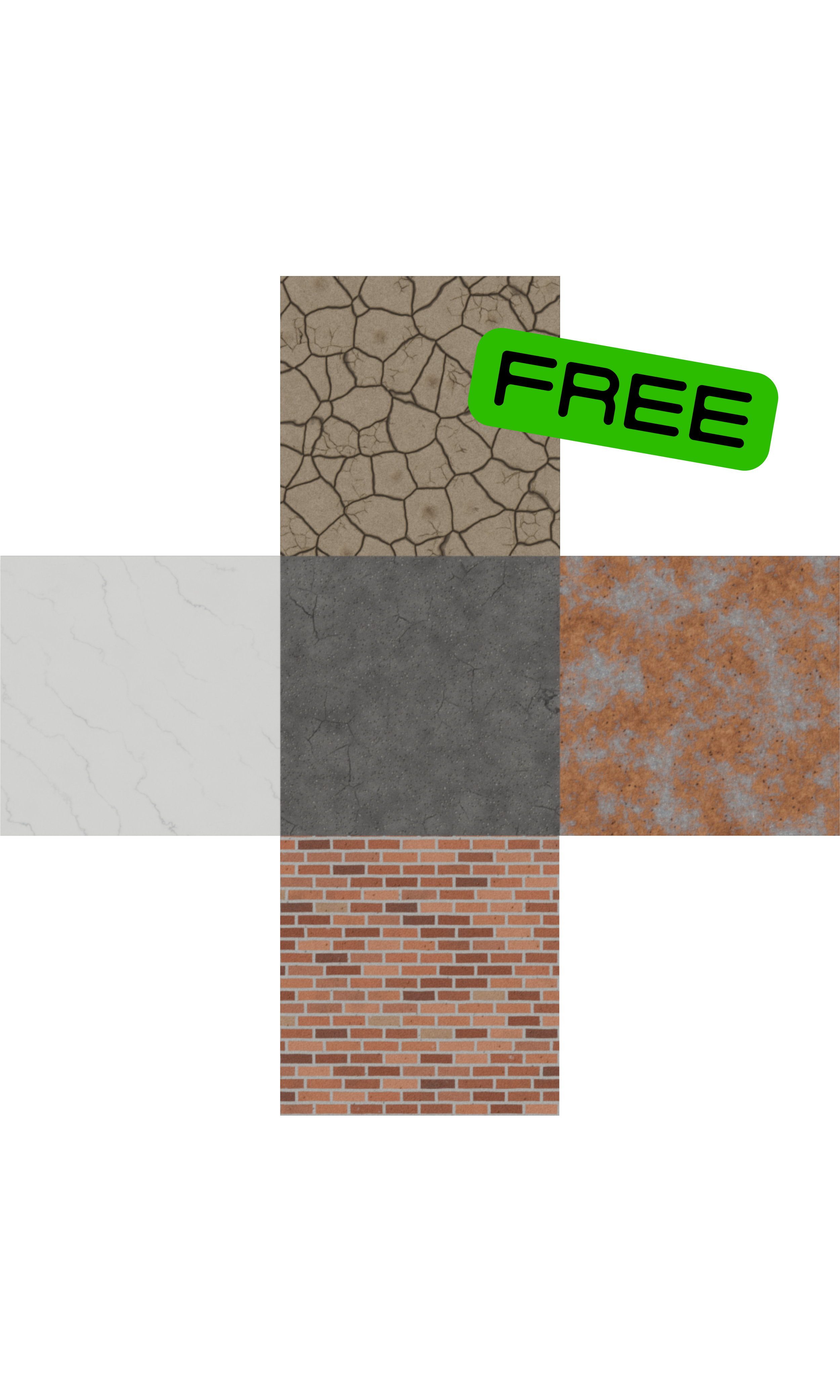
5 Free Procedural Materials for Blender
Five fully procedural materials for Blender, one from each of five categories: stone, brick, road, soil and metal. No image textures, no UV unwrapping, no resolution limit. Delivered as a ready-to-open .blend with every material applied to a preview cube. Nothing here is a scanned photo or a downloaded texture map, so there is nothing to resize, tile or re-link. Zoom in as far as you want and the detail holds up.
Every material was built and tuned individually, and each one uses a different core technique on purpose, so the set shows real range rather than five variations on the same noise setup.
What's in the pack
Carrara marble. Three separate vein systems, each with its own presence mask so the veining clusters the way real marble does instead of spreading evenly over the slab. Polished, with subsurface scattering for the translucent depth marble has.
Weathered red brick. The brick pattern is projected down all three axes and blended by face normal, so courses line up correctly on every side of the mesh. Nine brick tones driven by a per-brick random ID, plus chipped faces, sheltered grime, salt bloom and recessed mortar.
Worn asphalt. Sun-oxidised binder with aggregate raveled proud of the surface, hairline cracking clustered into worn patches, and traffic and oil staining.
Sun-baked cracked earth. Two crack networks over warped coordinates, with plate curl lifting the edges, plus small stones and grit.
Rusted iron. The rust coverage mask drives the Metallic input, so the oxide renders as a dielectric while the exposed steel underneath stays fully metallic. Pitting, flaking crust, and fine scratches that only show on the bare metal.
What's included
5 unique procedural materials
One .blend file, with each material already applied to its own cube so you can open it and start looking
Every node labelled in plain language, so the setups are readable and editable
A single "Master scale" Mapping node at the top of each material for resizing the whole thing at once
Technical details
Made in Blender 5.2.1. Requires Blender 5.2.1 or newer to open.
Built and previewed in EEVEE. The node trees use only the Principled BSDF and standard procedural textures, so they also render in Cycles.
Materials use Object coordinates, so they work on any mesh without UV unwrapping.
Surface relief is handled with bump mapping, so there are no subdivision or displacement modifiers to slow your scene down. If you want the wear to show in the silhouette too, the height output of each material is already built and labelled, so it is easy to route into displacement yourself.
No external files, no image textures, no missing-texture warnings. Small download.
How to use
Open the .blend directly to browse the previews, or use File > Append > Material to pull individual materials into your own project. Everything is self-contained in the material, so appending the material alone is all you need.
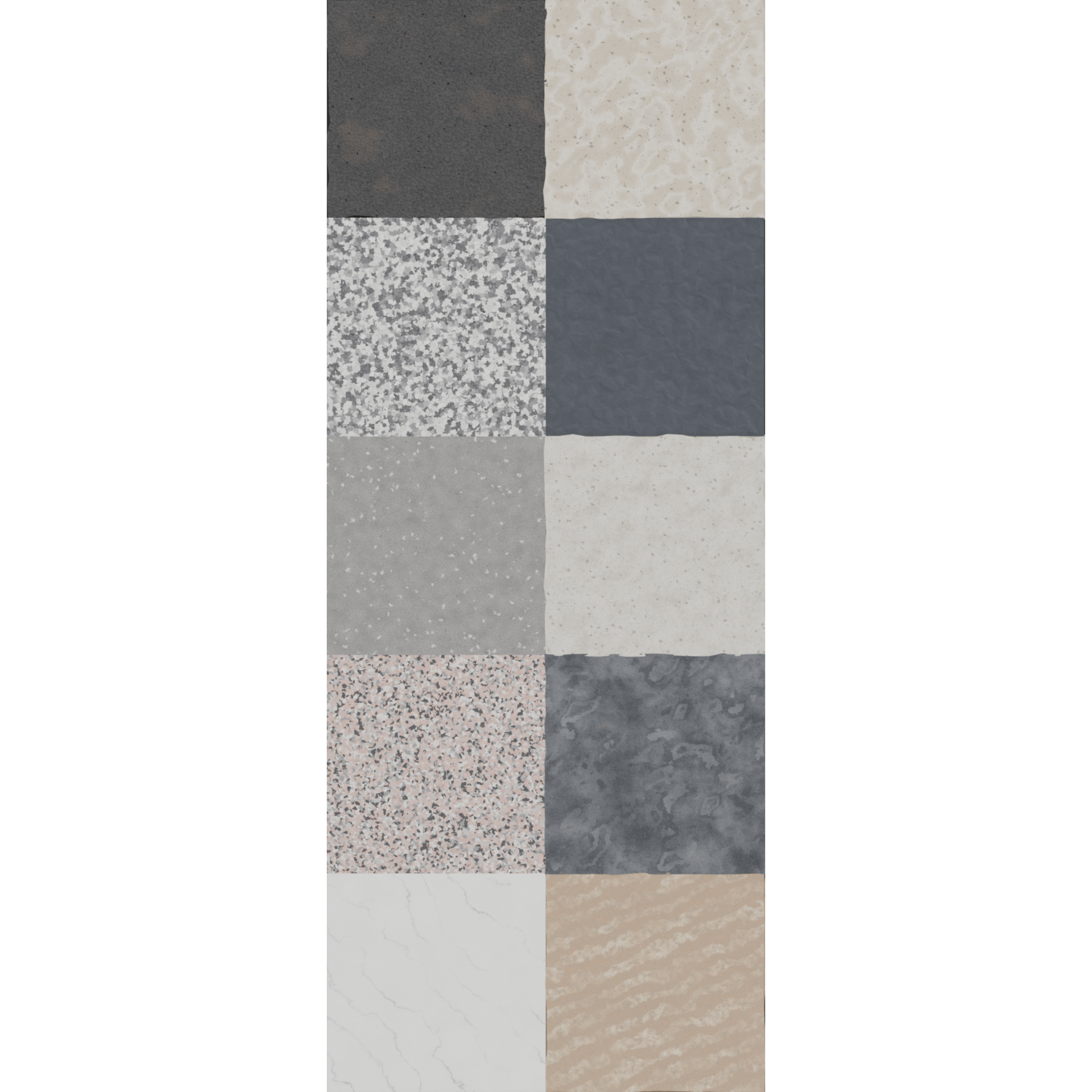
10 Procedural Stone Materials for Blender
Ten fully procedural stone materials for Blender. No image textures, no UV unwrapping, no resolution limit. Delivered as a ready-to-open .blend with every material applied to a preview cube. Nothing here is a scanned photo or a downloaded texture map, so there is nothing to resize, tile or re-link. Zoom in as far as you want and the detail holds up.
Every material was built and tuned individually rather than being colour variants of one setup.
Several of the materials go beyond bump mapping and use real geometry displacement, driven by Subdivision and Displace modifiers, so worn and eroded surfaces show up in the silhouette and not just in the shading.
What's included
10 unique procedural materials
One .blend file, with each material already applied to its own cube so you can open it and start looking
Every node labelled in plain language, so the setups are readable and editable
A single "Master scale" Mapping node at the top of each material for resizing the whole thing at once
Displacement modifier stacks pre-configured on the materials that use them
Technical details
Made in Blender 5.2.1. Requires Blender 5.2.1 or newer to open.
Built and previewed in EEVEE. The node trees use only the Principled BSDF and standard procedural textures, so they also render in Cycles.
Materials use Object coordinates, so they work on any mesh without UV unwrapping.
No external files, no image textures, no missing-texture warnings. Small download.
Viewport subdivision is set low and render subdivision higher on the displaced materials, so the file stays responsive while you work.
How to use
Open the .blend directly to browse the previews, or use File > Append > Material to pull individual materials into your own project. Displaced materials also need their modifier stack, so append the whole object if you want that geometry detail.
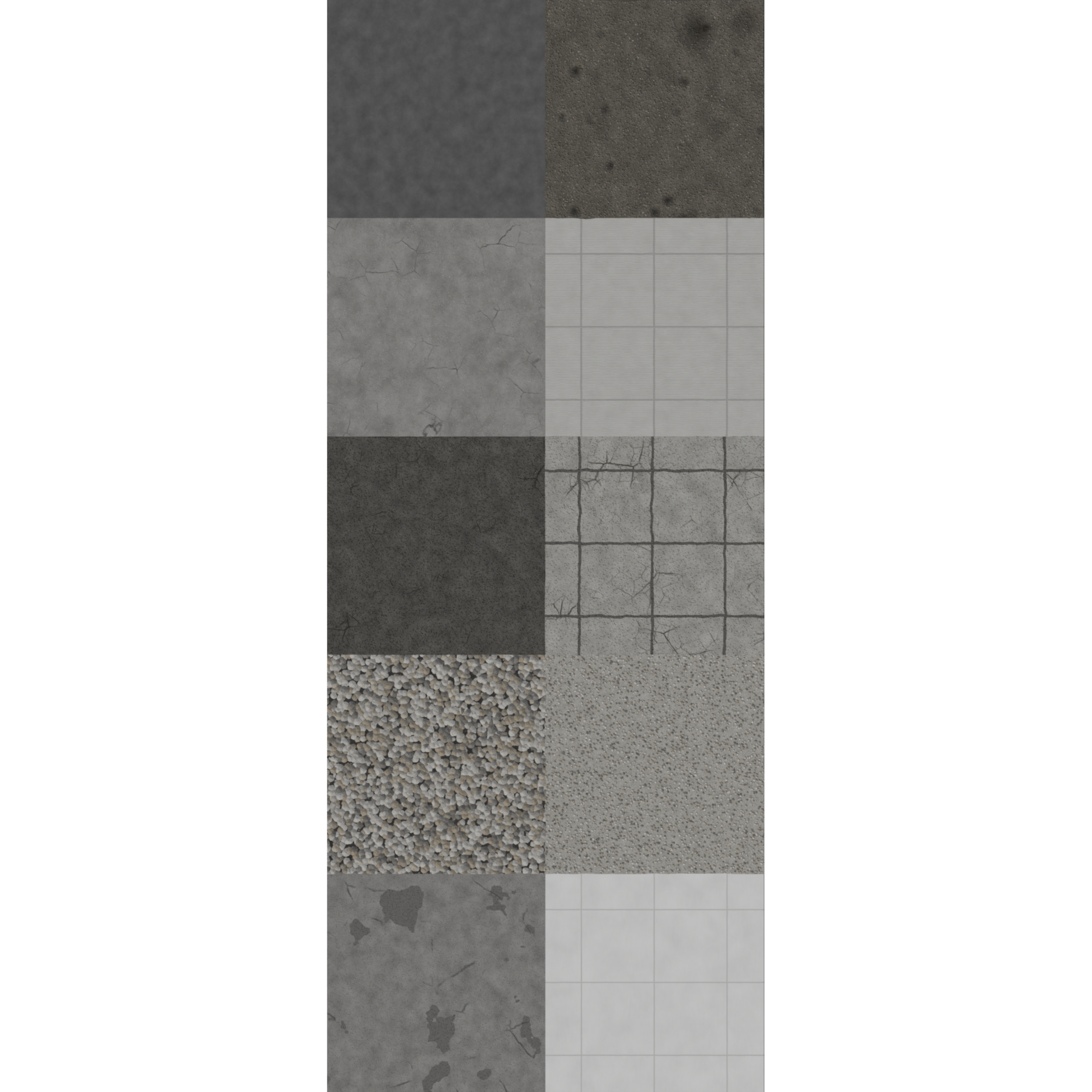
10 Procedural Road Materials for Blender
Ten fully procedural road materials for Blender. No image textures, no UV unwrapping, no resolution limit. Delivered as a ready-to-open .blend with every material applied to a preview cube. Nothing here is a scanned photo or a downloaded texture map, so there is nothing to resize, tile or re-link. Zoom in as far as you want and the detail holds up.
Every material was built and tuned individually rather than being colour variants of one setup.
Several of the materials go beyond bump mapping and use real geometry displacement, driven by Subdivision and Displace modifiers, so worn and eroded surfaces show up in the silhouette and not just in the shading.
What's included
10 unique procedural materials
One .blend file, with each material already applied to its own cube so you can open it and start looking
Every node labelled in plain language, so the setups are readable and editable
A single "Master scale" Mapping node at the top of each material for resizing the whole thing at once
Displacement modifier stacks pre-configured on the materials that use them
Technical details
Made in Blender 5.2.1. Requires Blender 5.2.1 or newer to open.
Built and previewed in EEVEE. The node trees use only the Principled BSDF and standard procedural textures, so they also render in Cycles.
Materials use Object coordinates, so they work on any mesh without UV unwrapping.
No external files, no image textures, no missing-texture warnings. Small download.
Viewport subdivision is set low and render subdivision higher on the displaced materials, so the file stays responsive while you work.
How to use
Open the .blend directly to browse the previews, or use File > Append > Material to pull individual materials into your own project. Displaced materials also need their modifier stack, so append the whole object if you want that geometry detail.
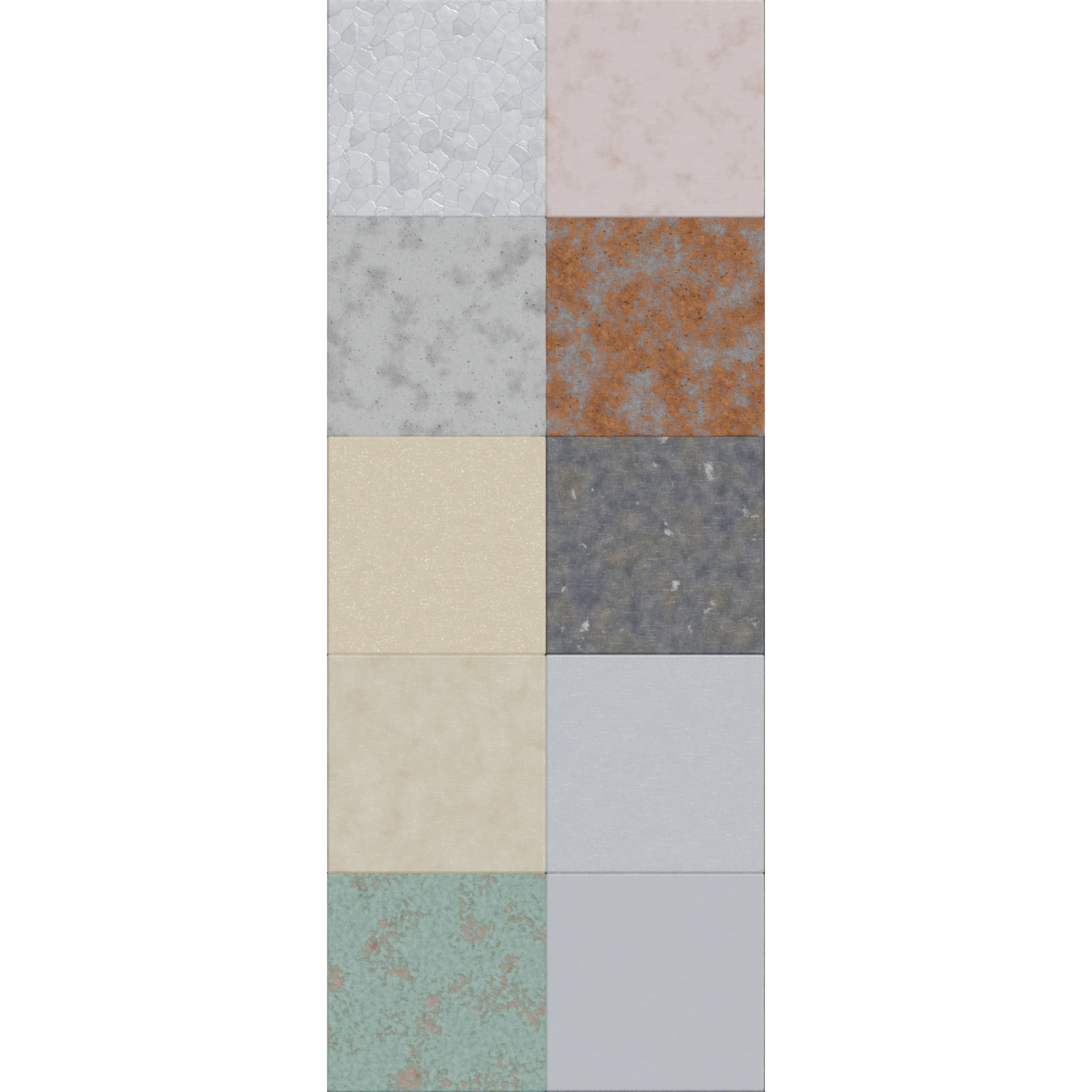
10 Procedural Metal Materials for Blender
Ten fully procedural metal materials for Blender. No image textures, no UV unwrapping, no resolution limit. Delivered as a ready-to-open .blend with every material applied to a preview cube. Nothing here is a scanned photo or a downloaded texture map, so there is nothing to resize, tile or re-link. Zoom in as far as you want and the detail holds up.
Every material was built and tuned individually rather than being colour variants of one setup.
Several of the materials go beyond bump mapping and use real geometry displacement, driven by Subdivision and Displace modifiers, so worn and eroded surfaces show up in the silhouette and not just in the shading.
What's included
10 unique procedural materials
One .blend file, with each material already applied to its own cube so you can open it and start looking
Every node labelled in plain language, so the setups are readable and editable
A single "Master scale" Mapping node at the top of each material for resizing the whole thing at once
Displacement modifier stacks pre-configured on the materials that use them
Technical details
Made in Blender 5.2.1. Requires Blender 5.2.1 or newer to open.
Built and previewed in EEVEE. The node trees use only the Principled BSDF and standard procedural textures, so they also render in Cycles.
Materials use Object coordinates, so they work on any mesh without UV unwrapping.
No external files, no image textures, no missing-texture warnings. Small download.
Viewport subdivision is set low and render subdivision higher on the displaced materials, so the file stays responsive while you work.
How to use
Open the .blend directly to browse the previews, or use File > Append > Material to pull individual materials into your own project. Displaced materials also need their modifier stack, so append the whole object if you want that geometry detail.
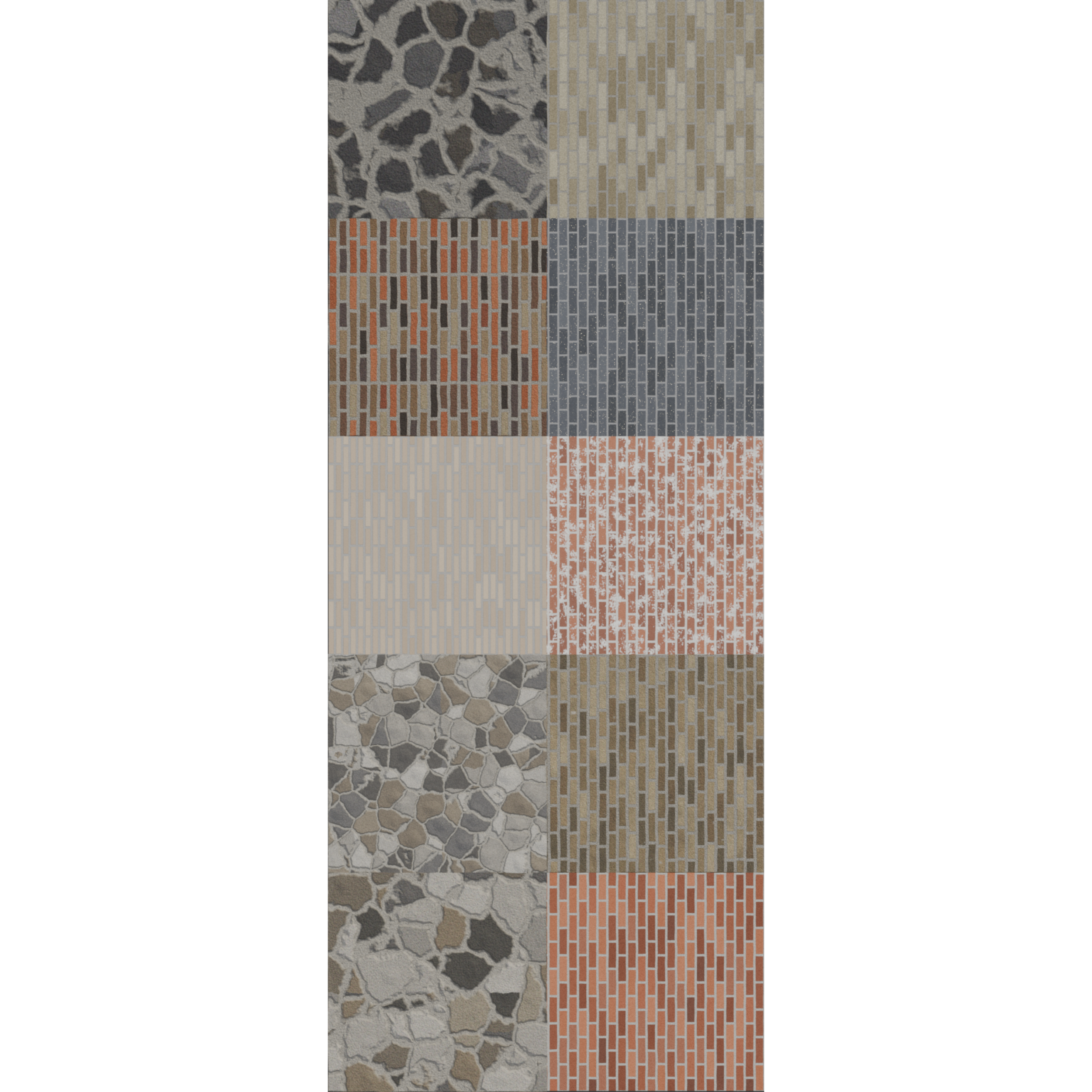
10 Procedural Brick Materials for Blender
Ten fully procedural brick materials for Blender. No image textures, no UV unwrapping, no resolution limit. Delivered as a ready-to-open .blend with every material applied to a preview cube. Nothing here is a scanned photo or a downloaded texture map, so there is nothing to resize, tile or re-link. Zoom in as far as you want and the detail holds up.
Every material was built and tuned individually rather than being colour variants of one setup.
Several of the materials go beyond bump mapping and use real geometry displacement, driven by Subdivision and Displace modifiers, so worn and eroded surfaces show up in the silhouette and not just in the shading.
What's included
10 unique procedural materials
One .blend file, with each material already applied to its own cube so you can open it and start looking
Every node labelled in plain language, so the setups are readable and editable
A single "Master scale" Mapping node at the top of each material for resizing the whole thing at once
Displacement modifier stacks pre-configured on the materials that use them
Technical details
Made in Blender 5.2.1. Requires Blender 5.2.1 or newer to open.
Built and previewed in EEVEE. The node trees use only the Principled BSDF and standard procedural textures, so they also render in Cycles.
Materials use Object coordinates, so they work on any mesh without UV unwrapping.
No external files, no image textures, no missing-texture warnings. Small download.
Viewport subdivision is set low and render subdivision higher on the displaced materials, so the file stays responsive while you work.
How to use
Open the .blend directly to browse the previews, or use File > Append > Material to pull individual materials into your own project. Displaced materials also need their modifier stack, so append the whole object if you want that geometry detail.
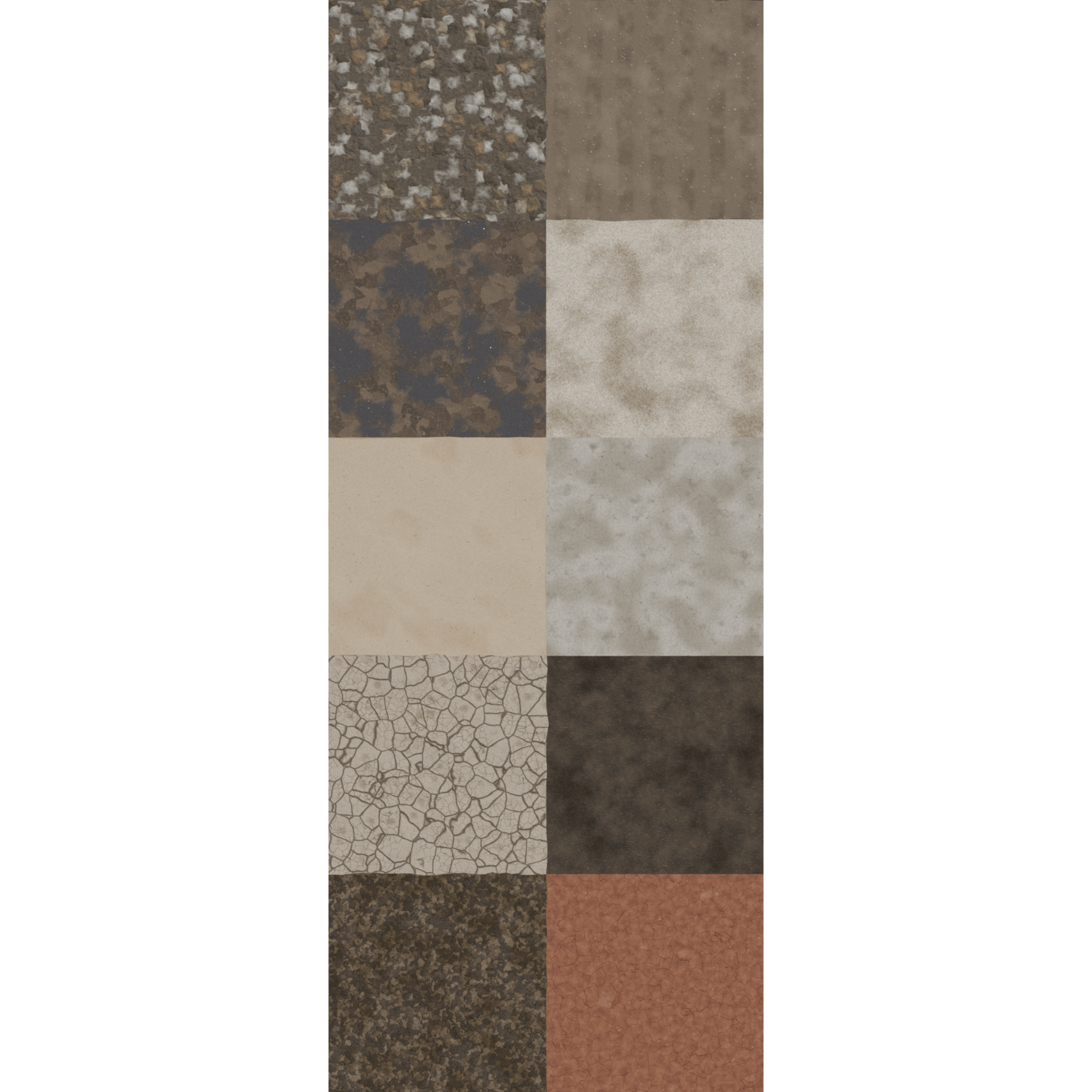
10 Procedural Soil Materials for Blender
Ten fully procedural soil materials for Blender. No image textures, no UV unwrapping, no resolution limit. Delivered as a ready-to-open .blend with every material applied to a preview cube. Nothing here is a scanned photo or a downloaded texture map, so there is nothing to resize, tile or re-link. Zoom in as far as you want and the detail holds up.
Every material was built and tuned individually rather than being colour variants of one setup.
Several of the materials go beyond bump mapping and use real geometry displacement, driven by Subdivision and Displace modifiers, so worn and eroded surfaces show up in the silhouette and not just in the shading.
What's included
10 unique procedural materials
One .blend file, with each material already applied to its own cube so you can open it and start looking
Every node labelled in plain language, so the setups are readable and editable
A single "Master scale" Mapping node at the top of each material for resizing the whole thing at once
Displacement modifier stacks pre-configured on the materials that use them
Technical details
Made in Blender 5.2.1. Requires Blender 5.2.1 or newer to open.
Built and previewed in EEVEE. The node trees use only the Principled BSDF and standard procedural textures, so they also render in Cycles.
Materials use Object coordinates, so they work on any mesh without UV unwrapping.
No external files, no image textures, no missing-texture warnings. Small download.
Viewport subdivision is set low and render subdivision higher on the displaced materials, so the file stays responsive while you work.
How to use
Open the .blend directly to browse the previews, or use File > Append > Material to pull individual materials into your own project. Displaced materials also need their modifier stack, so append the whole object if you want that geometry detail.
Contact Us
If you need additional products or services beyond what’s listed, please ask! We’re happy to expand, customize, or bundle offerings to suit your project. Our process is flexible and collaborative: tell us your needs, and we’ll propose options and a clear next step so you get exactly the creative support your brand requires.